
Magic Listen · song key finder
Play a song. Find the scale.
Hold your phone up to a speaker or play a riff. Magic Listen hears the notes, works out the key and shows you the scales that fit, so you know what to play over it. All the listening happens on your phone.

Free download · free trial · Magic Listen is iPhone and iPad only (iOS 27 or later)
How it works
- Open Magic Listen. Tap the round filter button at the bottom right of the home screen, then the Magic Listen card at the top of Filters.
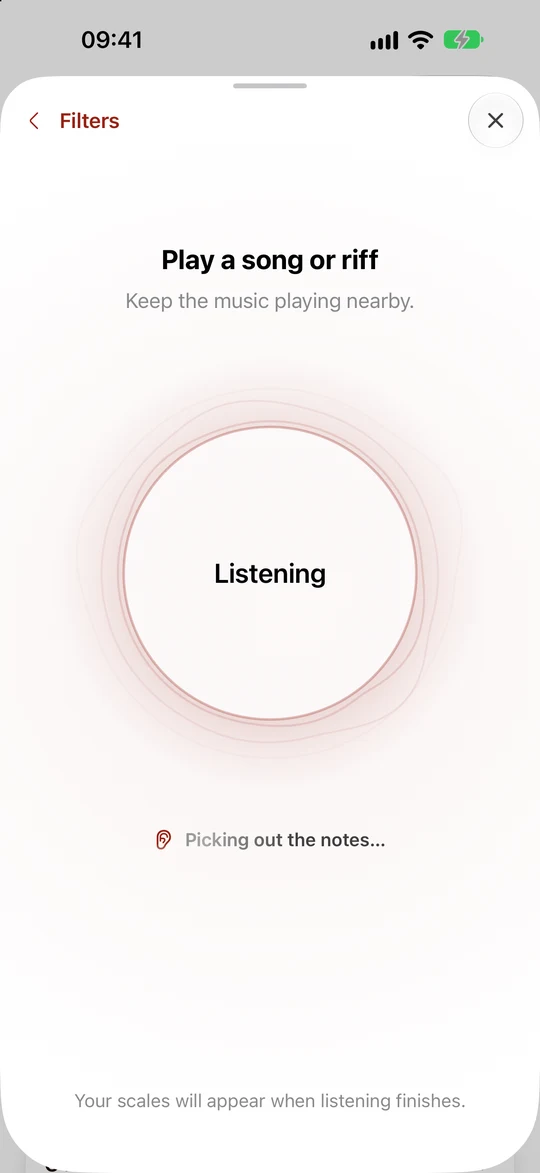
- Play the music. A song from a speaker, a video on another device, or a riff on your own guitar. Keep playing while Magic Listen hears the notes and works out the key. It listens until it is sure, taking longer when major and relative minor need telling apart.
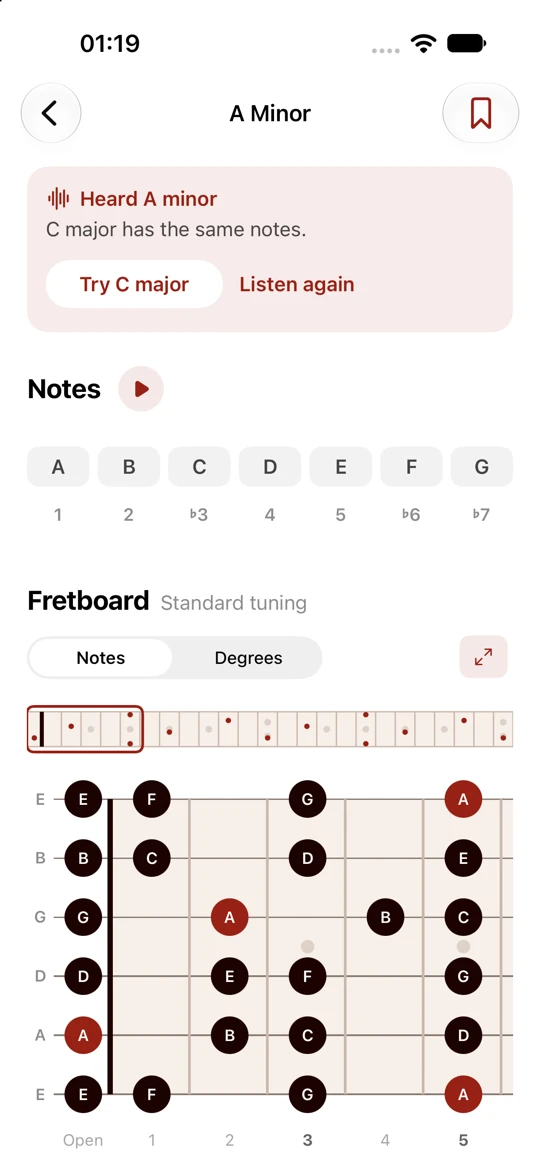
- Play the scale. The app opens the key’s scale page, such as E minor, with its notes, the chords that belong to it and the whole fretboard. Tap any note to hear it. If the notes do not point to one key, it filters the scale list instead so you can explore the matches.
Major, minor and the scale that fits
Every minor key has a relative major that uses exactly the same seven notes. E minor and G major. A minor and C major. Played over a song, they’re the same notes in the same places on the neck. What differs is the home note: the one the song keeps coming back to.
Magic Listen listens longer to tell major and relative minor apart. On the result it tells you what it heard (“Heard E minor”), names the relative (“G major has the same notes”) and lets you switch with one tap. Check which feels like home with your own ear; over an E minor song, the E minor pentatonic shape you reach for still fits.
What it’s good at, and what it isn’t
- Any source you can hear. Streaming apps, the radio, a band in the room, your own playing.
- On device, offline. The analysis runs on your iPhone or iPad. Nothing is uploaded or recorded.
- Major and minor keys. It usually finds a major or minor key. Modes can share those notes with a different home note, so use your ear to choose the scale to play. Unusual note sets filter the scale list instead of opening one scale.
- One key per listen. If a song changes key, listen to each section on its own. You can bookmark the scales you come back to.
- Listens until it is sure. There is no fixed countdown. Keep the music playing while it checks the notes and the key.
On Android or an older iPhone? Find it from the notes
If you can pick out a few notes of the riff, the free online scale finder shows every scale that contains them, and the app does the same across all 1,870 scales. Start with the note the song resolves to, add three or four more, and the list narrows quickly. Then check: does G major or E minor feel like home?
Questions
How do I find out what key a song is in?
Open Guitar Scale Finder, tap the filter button, then Magic Listen. Play a song from a speaker or a riff on your guitar. It listens until it is sure of the key, then opens its scale. Unusual note sets filter the scale list instead. To do it by ear, find the note the song keeps resolving to, then check whether its major or minor chord fits.
Does it work with songs from Spotify, Apple Music or YouTube?
Yes, as long as you can hear it. Play the song out loud from another device or a speaker and hold your phone near it. The app listens through the microphone, so it works with any source, including a band in the room.
Why does it show two keys?
A minor key and its relative major use exactly the same notes: E minor and G major, A minor and C major. Magic Listen listens longer to tell them apart, then tells you which one it heard and offers the relative with one tap on the result. Both give you the same notes and the same fretboard shapes, so your scale works either way.
Is my audio uploaded or saved?
No. The key is worked out on your iPhone or iPad with Apple’s on-device music analysis. Nothing is uploaded, and the audio is not saved.
What do I need?
Magic Listen is only available on iPhone and iPad, with iOS 27 or later. It is not in the Android app. Everything else, including finding scales from the notes you know, works on iOS 15 and later and on Android.
Can it find modes like Dorian or Mixolydian?
Magic Listen usually finds a major or minor key. Modes can share those notes with a different home note. Use the notes to explore scales that fit, and check the home note by ear. Unusual note sets filter the list of scales instead of opening one scale.